SOL BEACH → MERIDIAN → RUSTPORTNEON
Phone, tablet or desktop · WebGL · No account
NEON
COAST
Take the red car and follow the beach road to the Sol Wheel: the first job takes under a minute, and the police leave you alone until it is done. Then run odd jobs, drive a cab for fares, buy a place that pays rent, or find out how long you last once the helicopter has its light on you. Now on a phone too: two thumbs, landscape or upright.
Play Neon Coast →Download offlinePhone, tablet or desktop · WebGL · No account
NEW IN 1.6
A city in your pocket, in focus
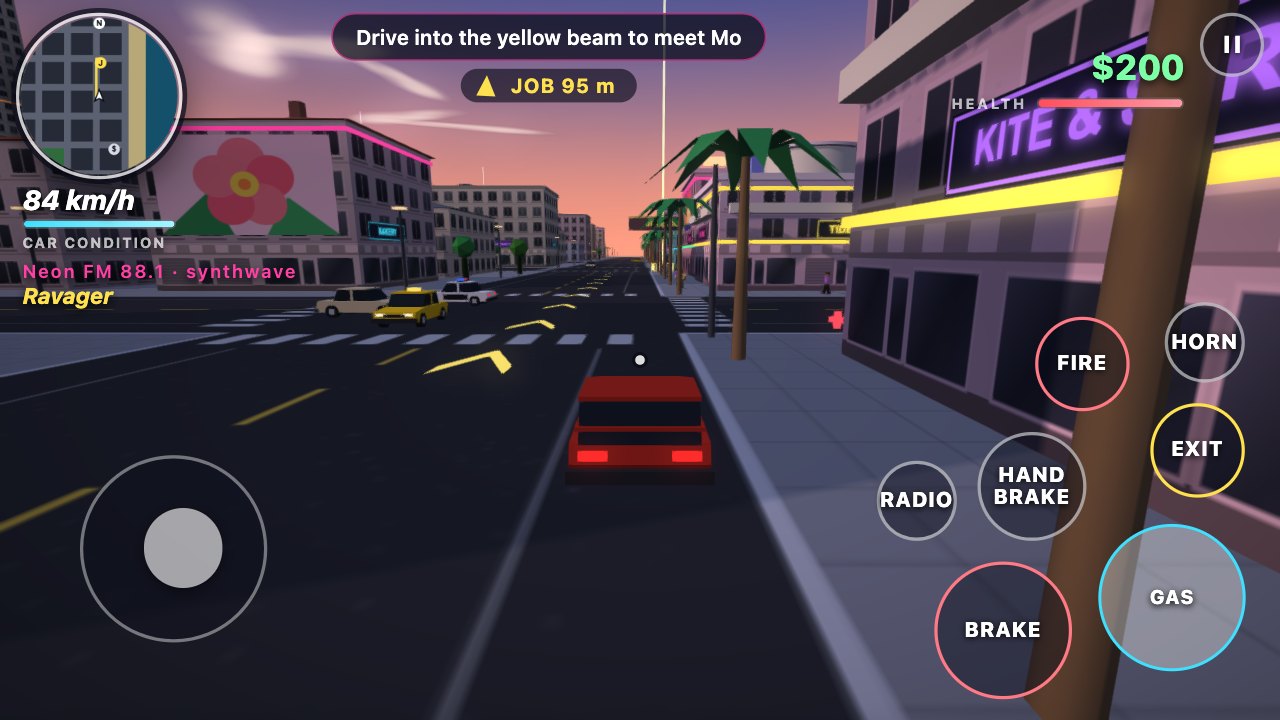
- As sharp as the screen. On a phone, Auto graphics draws 2 pixels per point with the neon glow and adds shadows when the frame rate allows. On a slower phone it gives up shadows first and sharpness last.
- Shots find their target. On a touch screen each shot turns onto a target near the crosshair. Settings can swap the steering stick for two arrows.
- Touch controls. A stick under the left thumb walks and steers. GAS, BRAKE and HAND BRAKE sit under the right thumb, with CAR, FIRE, JUMP, HORN and RADIO around them. Drag the view to look.
- Landscape or upright. The screen rearranges itself for both. On its side the phone shows more road; upright, the lens widens so the street still fits.
- An icon on the home screen. iPhone: Share, then Add to Home Screen. Android: the browser menu, then Install app. It opens full screen and, after one visit, without a network.
- From 1.5: touch controls and the home-screen icon. From 1.4: buildings with outlines, a learner phase with no stars before the first job, the Paper Round on foot, three radio stations. From 1.3: the Sol Wheel ride and the daytime look. From 1.2: cab fares, property, the helicopter at four stars.