Plain files, no lock-in
Everything is Markdown in a brain/ folder. Delete Cairn and it still reads fine on GitHub, in Obsidian or in VS Code.
Capture ideas, brainstorm, record decisions and move tasks, all as plain Markdown next to your code. Works with Obsidian, VS Code and any AI assistant.
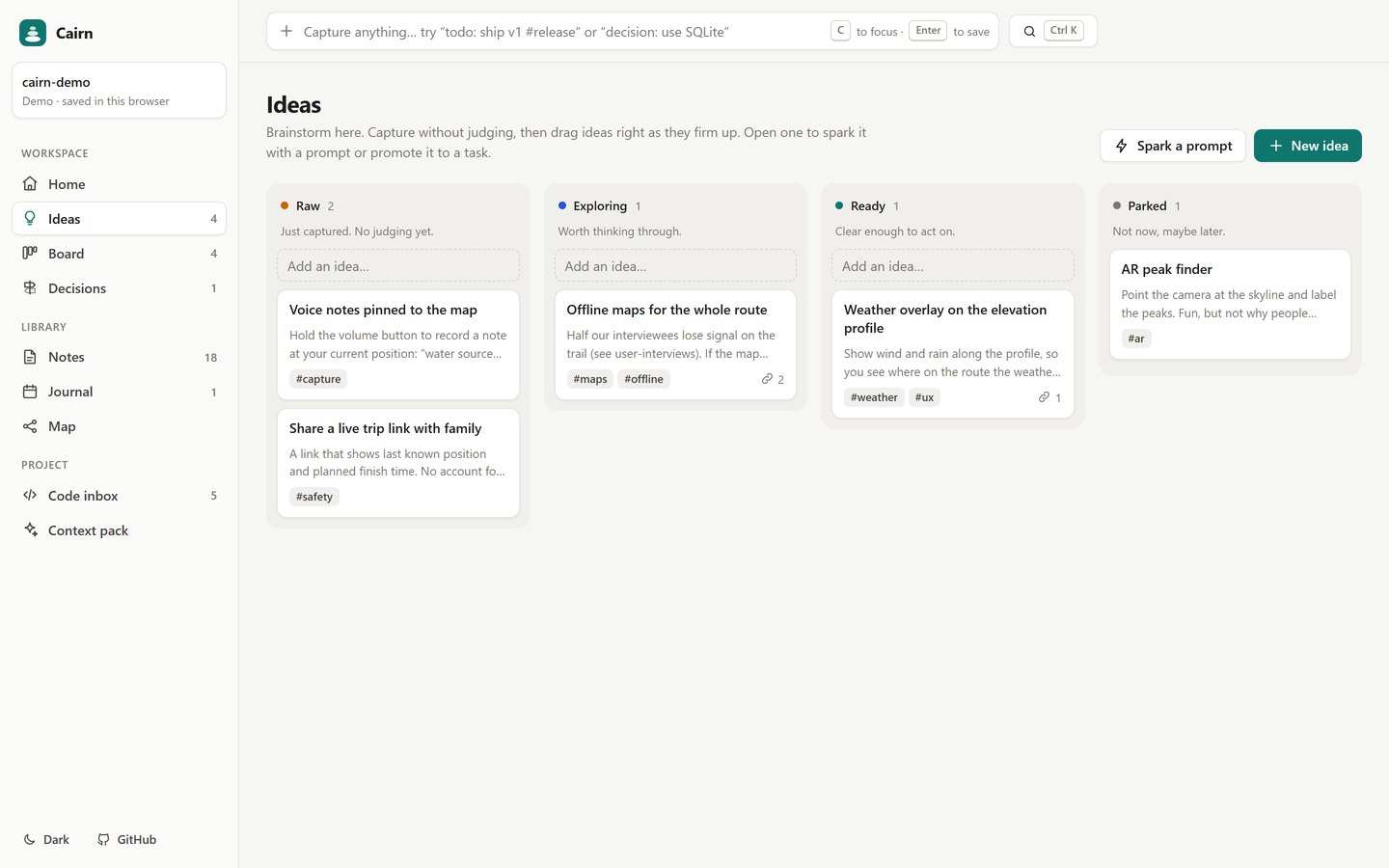
Cairn puts one calm place inside the project, built around how project work actually moves: capture, brainstorm, decide, do, remember.
Ideas sit in Notion, tasks in GitHub Issues, decisions in Slack threads, TODOs in code comments, and the "why" lives in someone's head; Obsidian and Notion are great at notes, but neither knows anything about your repo.
Everything is Markdown in a brain/ folder. Delete Cairn and it still reads fine on GitHub, in Obsidian or in VS Code.
Turns TODO/FIXME comments into tasks that remember the file and line, and commits the brain in one click.
One click writes brain/CONTEXT.md, a project brief Copilot, Claude, Cursor or ChatGPT can read. No API keys.
A sample project (an offline hiking app) right in your browser.
At juw12.github.io/cairn choose Open a repo folder.
python -m cairn --root . opens 127.0.0.1:4777 with code scanning and one-click Commit brain.
One bar on every screen. todo: ship v1 #release, decision: use SQLite, log: fixed the bug or just text (an idea). It shows where the note will go before you press Enter.
Raw → Exploring → Ready → Parked. Drag ideas right as they firm up. Spark drops a thinking prompt into an idea; Promote to task creates a linked task.
To do → Doing → Done with drag and drop, checklists and progress bars.
Lightweight decision records (context, options, decision, consequences), numbered and reviewed in PRs like code.
Markdown editor with preview, [[wikilinks]], backlinks, tags, a page per day and a graph of how everything connects.
Every TODO, FIXME and HACK comment in the repo. One click makes a task that remembers file:line.
A one-page brief (doing now, up next, decisions in force, open questions) saved as brain/CONTEXT.md for teammates and AI assistants.
Ctrl/⌘+K across every note and command. C jumps to capture.
Look up anyone on GitHub and see their proof of work, read from their brain's files: working on, shipped, decisions, open to collaborate. Open their brain read-only and Ask to join (opens a prefilled GitHub issue).
From the README’s “Use it” section. Full options, requirements and troubleshooting are there too.
Open the README$ git clone https://github.com/juw12/cairn
$ cd your-project
$ python -m cairn --root . # opens http://127.0.0.1:4777
$ cairn add "todo: ship v1 #release" # capture from the terminal
$ cairn context # write brain/CONTEXT.mdStraight from the README, so you know what you're getting before you try it.
90 files in the repo · 12 commits since Nov 2026 · last updated 6 Nov 2026.
Browse the codeDesign pass: map labels never overlap, 320px phones fit, views stop branching on store mode
Split app.js into modules: ui, state, views, map, people, drawer, actions, palette, welcome
Refine log: device flow live and confirmed by owner (round 4, 9.8)
Turn on Continue with GitHub (device flow via cairn-auth Worker)
Sign-in round 3: land in your brain, pre-filled token link, real-GitHub check
Web, Python CLI. You can try it in the browser with nothing to install.
The commands in the “Use it” box above come straight from the README. Paste them into a terminal; the README covers options and troubleshooting.
No account and no telemetry. The only external requests go to api.github.com and raw.githubusercontent.com, and only when you look someone up or open a published brain.
Notion lives in its own cloud, so your repo can't see it.
Yes. The context pack writes brain/CONTEXT.md, a short brief of what's in progress, what's next and which decisions are in force.
Opening a real repo folder in the browser needs Chrome or Edge on desktop (File System Access API). Looking people up uses unsigned GitHub API calls, limited to 60 per hour per IP; results are cached for 10 minutes.
Not yet: it's marked “v1.0” and still changing. The README always has the current state.
Yes. The source is public on GitHub under the MIT licence.
A second brain that lives inside your repo.