Watch buyers decide
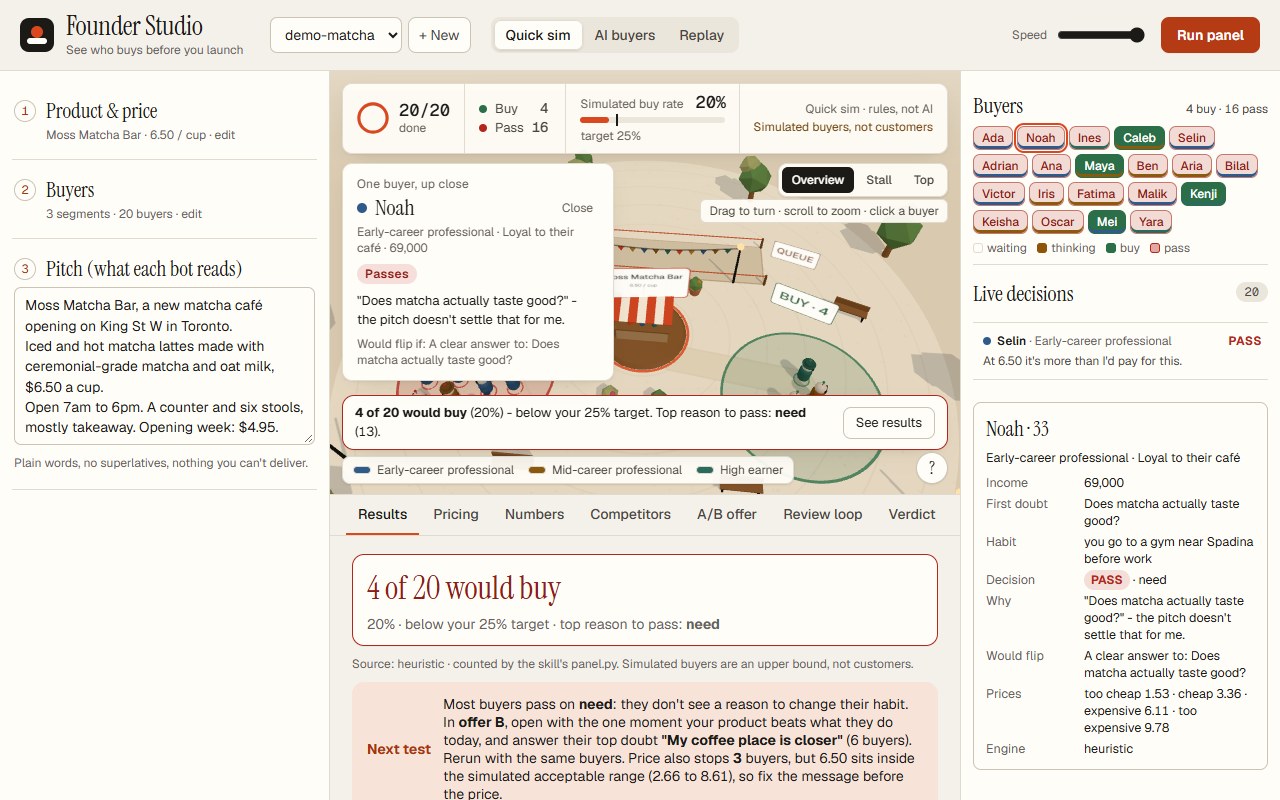
3D buyer bots walk up to your stall, think, and walk to a BUY or PASS pile, with each decision and its reason in a live list.
A pre-launch simulator for the ambitious-founder skill. Set a product, price, buyer segments and pitch, then watch 3D buyer bots walk to BUY or PASS. Every number is checked by the skill's own scripts.
It runs locally on Python's standard library with three.js bundled, so there is nothing to install.
git clone https://github.com/juw12/founder-studio, then cd founder-studio.
Run python server.py. It prints its URL (default http://127.0.0.1:8777) and opens the demo project; --root points it at your own founder folder.
Pick Quick sim or AI buyers, press Run panel, then read the Results, Pricing, Numbers and Verdict tabs.
3D buyer bots walk up to your stall, think, and walk to a BUY or PASS pile, with each decision and its reason in a live list.
Five reviewer bots (the Offers, Product and Monopoly lenses, a clarity check and the CFO lens) walk up to the stall, read the pitch and the last run, and post FIX, OK or YOUR CALL. An editor applies the fixes, the same buyers judge the new version, and only a version that wins more buyers is kept.
A seeded heuristic: need, price against the market anchor and income, and the objections your pitch answers. It is labelled heuristic: not AI and not evidence.
An LLM reads each buyer's isolated brief. Works with any OpenAI-compatible endpoint (OpenAI, Ollama, LM Studio, OpenRouter) or Anthropic; a key typed into the form is not saved to disk.
Deals the same buyers to pitch B and shows which buyers you won or lost.
The Pricing tab draws the Van Westendorp curve with the skill's van_westendorp.py.
Numbers runs unit_economics.py with what-ifs. Verdict runs compile.py and ends with one recommended next test.
A competitors.md editor plus a board of the objections nobody has answered yet.
Every screen says simulated buyers are an upper bound, not customers. The verdict reads only the official panel, which is never overwritten silently.
From the README’s “Run it on your PC” section. Full options, requirements and troubleshooting are there too.
Open the README$ git clone https://github.com/juw12/founder-studio && cd founder-studio
$ python server.py # opens the demo project in ./projects
$ python server.py --root path/to/founder # one founder folder from the skill
$ python test_api.py # 17 smoke checksStraight from the README, so you know what you're getting before you try it.
45 files in the repo · 11 commits since Nov 2026 · last updated 7 Nov 2026.
Stack as stated in the README. The repo also bundles the Pyodide runtime in docs/pyodide for the online demo; its own package files are not part of the app.
Browse the sourceReview loop: board-lens reviewer bots review the pitch live in the arena, an editor applies fixes, the same buyers judge each version, keep-best…
Design pass: Graphite theme, no emoji/purple, calmer arena, setup summaries, honest price advice, safer writes
Design pass r7: labels never cover the stall sign, stronger thinking ring, wider piles, modes explained, reopenable hint
Design pass r5-r6: tidy BUY/PASS piles, live decision ticker, results headline, Skip to results, collapsed optional setup
Test_api: use the app's tool lookup and high ports (works when installed in the skill)
Web, Python. You can try it in the browser with nothing to install.
The commands in the “Run it on your PC” box above come straight from the README. Paste them into a terminal; the README covers options and troubleshooting.
Python standard library only, with three.js bundled: no install step and no CDN. Your project files stay on your PC.
No. It is a filter for bad ideas, not proof of demand.
No. In Quick sim it adds a line naming each doubt with a slot for your true answer; with AI, new claims are marked (confirm).
The verdict reads only the official panel.
A simulated panel is a filter for bad ideas, not proof of demand. Quick sim is labelled heuristic: it is not AI and it is not evidence.
Not yet: it's marked “live” and still changing. The README always has the current state.
Watch simulated buyers decide before you launch.